Obsidian
Highlights in the editor, a sidebar in document order, threaded replies, and a composer that is Obsidian's own markdown editor.
Obsidian plugin · CLI · MCP server
Select a passage, leave a comment on it, and propose a replacement that applies in one click. Comments are stored in the note's own frontmatter, so they travel with the file through sync, git, export and rename.
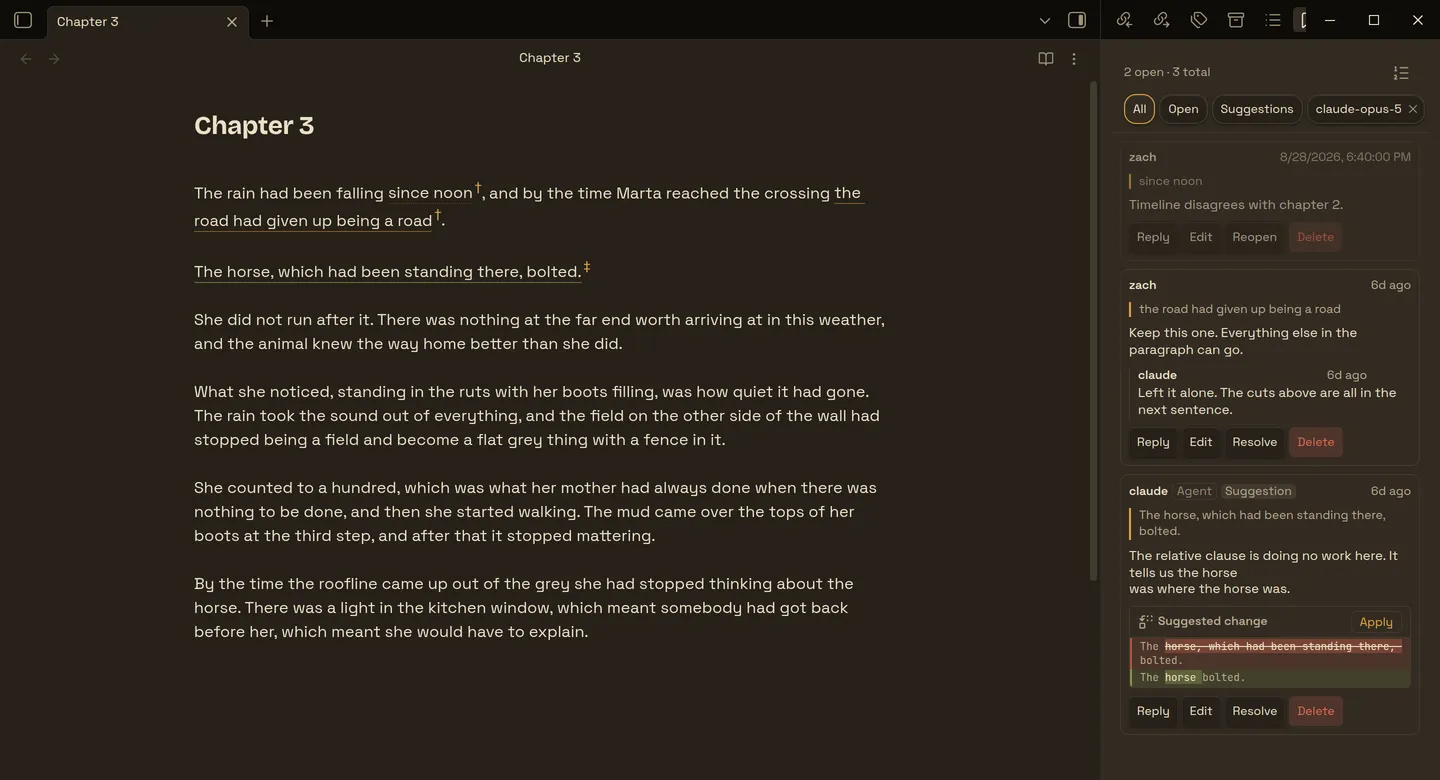
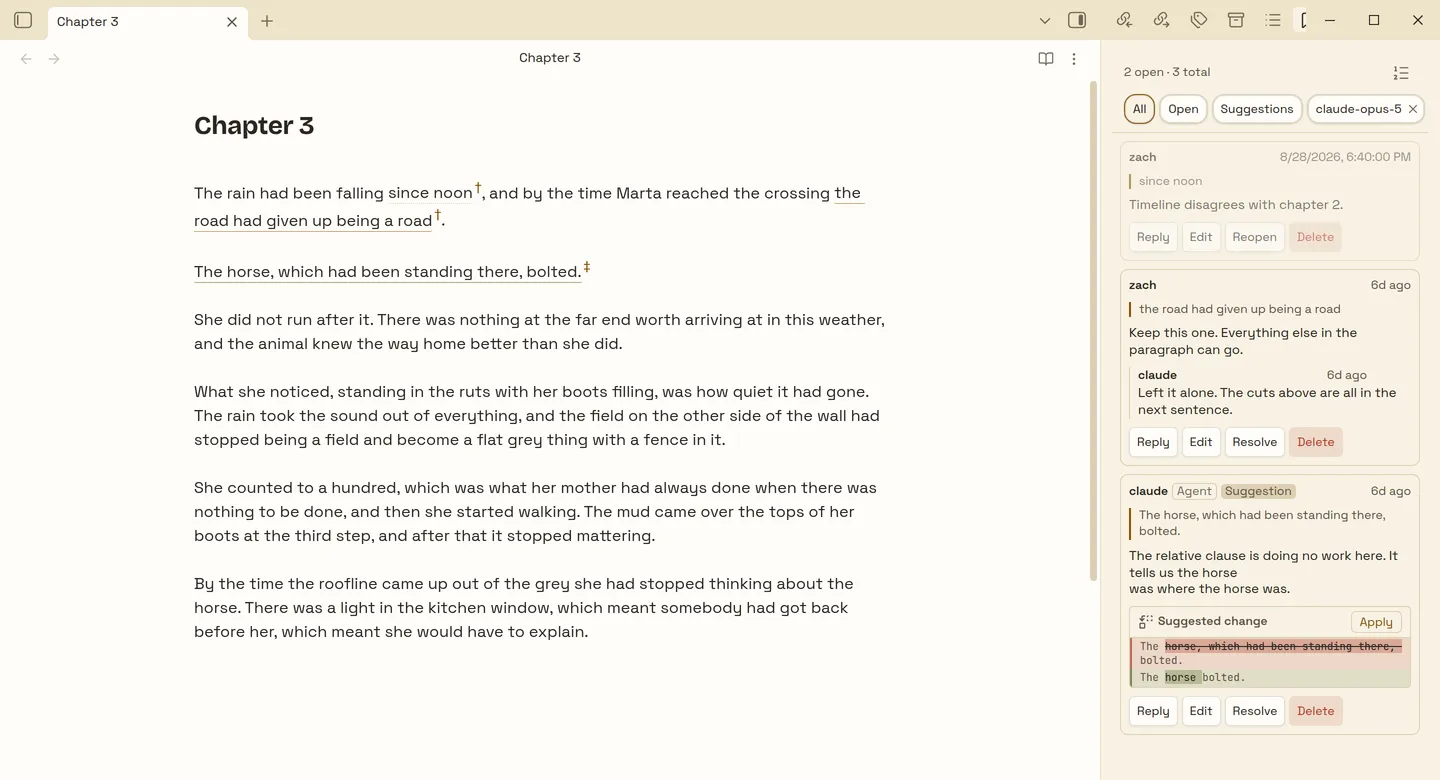
An obelus was the mark an ancient editor drew in the margin of a manuscript to say: this passage is disputed.
Three front ends
The storage format is the interface. Anything that can edit a file can leave a comment the plugin will render, so the same comments are reachable from inside Obsidian, from a shell, and from a model.
Highlights in the editor, a sidebar in document order, threaded replies, and a composer that is Obsidian's own markdown editor.
Four commands: list, comment, reply, resolve. A write touches only the frontmatter, so a comment can land on a note you have open in Obsidian without disturbing what you are typing.
The same four as MCP tools. Ask the agent you already have open to review a note, and its remarks appear in the sidebar of the note you are already reading.
Storage
Everything sits under one frontmatter key, in plain YAML that reads and diffs like the rest of the note and moves with it through a rename, a sync or a git merge. Unknown keys are put back on a round-trip, so a newer version's fields are never stripped by an older one.
---
title: Chapter 3
obelisk_schema: 3
obelisk:
  - id: cq7fk2m9x
    author: claude
    origin: { kind: agent, model: claude-opus-5, run: r7k2mq }
    created: 2026-08-29T14:02:11.000Z
    body: |-
      The relative clause is doing no work here.

      ```suggestion
      The horse bolted.
      ```
    anchor:
      from: { line: 12, col: 0 }
      to: { line: 12, col: 47 }
      quote: The horse, which had been standing there, bolted.
---
Anchoring
A comment attaches by searching the note for the exact text it was written on. Nothing fuzzy-matches, re-finds, or scores a near miss. An edit anywhere else in the note leaves it attached, whether that edit happens in Obsidian, in another editor, or in a git merge, because the quote is still the quote.
Quote found
…and by the time Marta reached the crossing, the horse, which had been standing there, bolted.
zach
Two clauses fighting over one sentence.
Quote gone
…and by the time Marta reached the crossing, the horse bolted.
zach
Two clauses fighting over one sentence.
† Detached. The quoted passage is no longer here
When the quoted passage is gone, the sidebar flags the comment as detached and it highlights nothing. It is never moved onto a different passage and it is never dropped. Restore the text and it reattaches on its own, because nothing about where a comment sits is ever written down.
Two clauses fighting over one sentence, and the
first one never earns its keep.

```suggestion
The horse bolted.
```

Happy to be talked out of it; see the note in ch. 2.
Suggested edits
A suggested edit is a fenced suggestion block inside an ordinary comment, the way GitHub does it, rendered as a word-level diff against the quoted passage with an Apply button. The reasoning and the rewrite sit in one body, and a reply can offer a counter-proposal.
Applying refuses if the underlying text has changed since the proposal was written. That condition is the same one behind whether the comment is attached at all, so a splice always lands on exactly the characters the commenter read.
How suggestions workAgents
A model reviews a note and its remarks appear as comments on the passages they are about, badged, with the whole pass behind one filter chip and one dismissal. Or you leave the comments and ask a model to read them, make the edits, and resolve them.
$ obelisk list chapter-3.md
$ obelisk comment chapter-3.md \
    --quote "The horse, which had been standing there, bolted." \
    --body  "The relative clause is doing no work here." \
    --run   r7k2mq

comment cq7fk2m9x written to chapter-3.md$ claude mcp add obelisk --scope user -- npx -y obelisk-mcp
obelisk_list obelisk_comment
obelisk_reply obelisk_resolveA line number is never an anchor. A model asked for one will produce a plausible wrong number, and a plausible wrong number attaches a comment to the wrong paragraph without ever looking like an error, so a line is only ever a tiebreak between two identical quotes. The quote itself has to appear in the note character for character. If it does not, nothing is written, and the reason is printed.
The rest of it
Comments and replies render as real markdown: links, lists, callouts, embeds and math, exactly as they would in a note.
Comments are written in Obsidian's own markdown editor, so Cmd+B, list continuation, [[ autocompletion and live preview behave as they do anywhere else.
On any comment, stored alongside it, and markdown all the way down, suggestion blocks included.
Commented passages carry an underline and a † that opens the comment in the sidebar. Overlapping comments nest.
A resolved comment stays in the list, grayed, because it still marks its passage in the note. The Open filter is one chip away.
Deleting a comment, a single reply, or a whole agent pass offers an undo rather than a dialog asking whether you meant it.
Rewrite a comment in the composer that wrote it. The anchor is left alone: changing what you said never changes what you said it about.
An external write re-reads the file first and refuses if it changed underneath, so a pass cannot lose an edit you were making.
A schema version sits beside the comments, and a malformed entry is dropped with a warning rather than taking the sidebar down.
The plugin is in the Obsidiancommunity plugin directory: search for Obelisk under Browse. The CLI and the MCP server are on npm as obelisk-mcp.